Visual Notetaking : An interactive Guide to visual communication and sketchnoting in handwritten marker sketches on big billboards in a conference room inline PNG
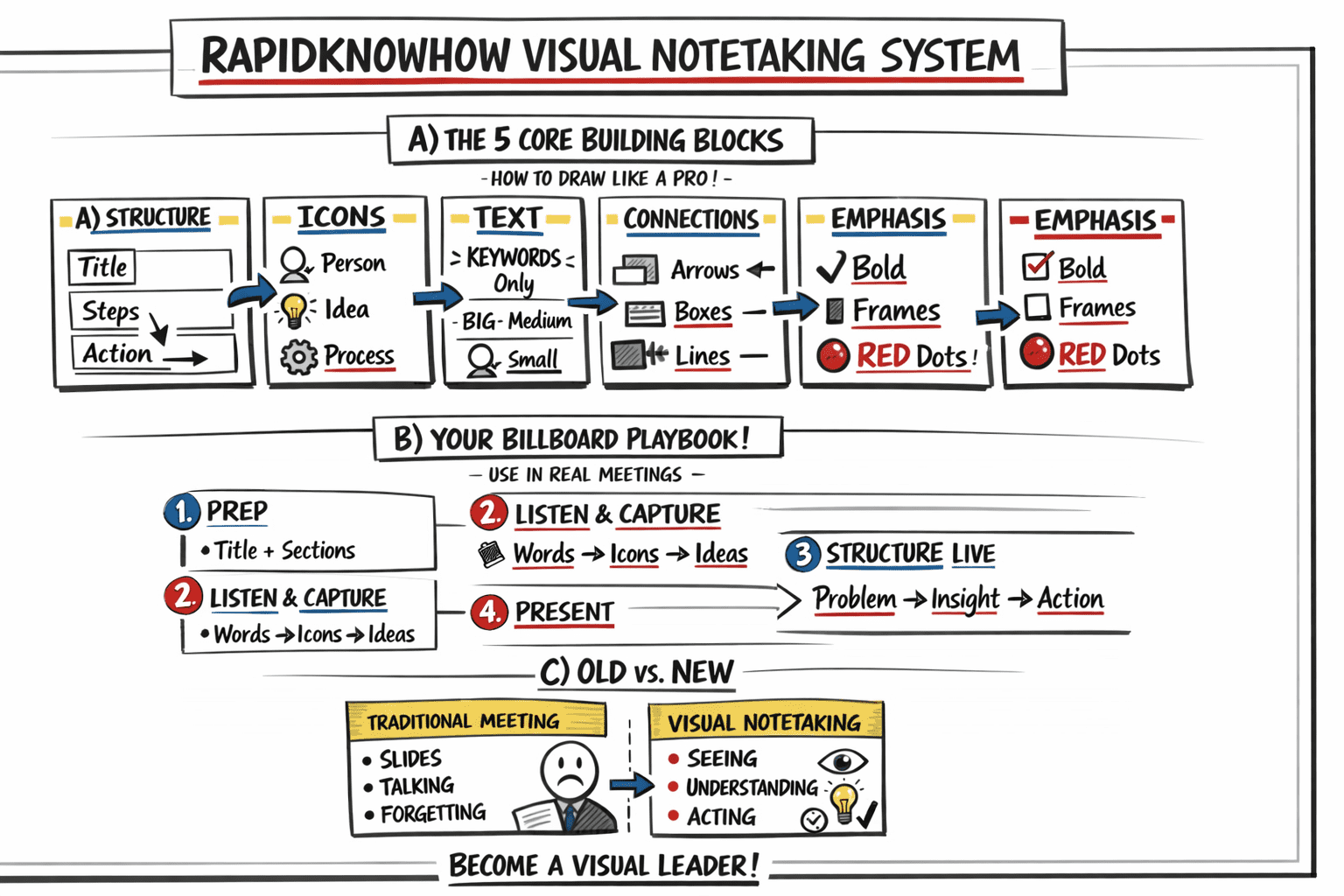
A) VISUAL NOTETAKING – THE BIG IDEA (CONFERENCE ROOM SCENE)
Feynman Clarity Sentence:
👉 “Visual Notetaking turns thinking into seeing — so everyone understands, remembers, and acts faster.”
What you see in the scene:
- A leader at the front explaining a large sketchnote board
- Hand-drawn icons + words instead of slides
- A storyline flowing left → right
- Audience engaged (not passive)
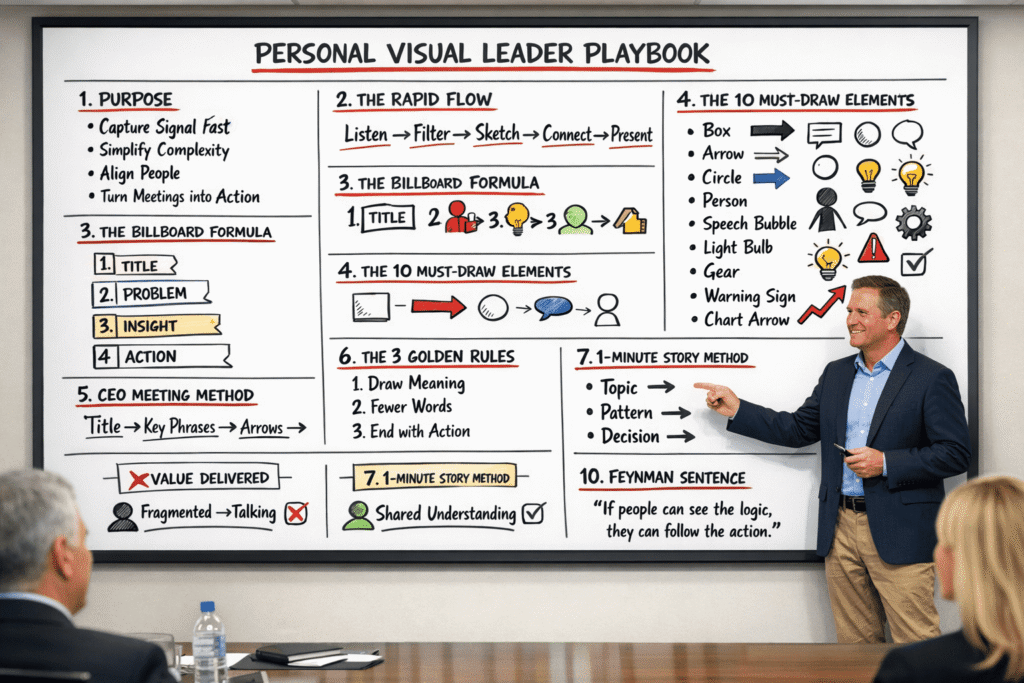
B) THE 5 CORE BUILDING BLOCKS (HOW TO DRAW LIKE A PRO IN MINUTES)
1. STRUCTURE (The Map)
- Title (Top Left)
- Sections (3–5 blocks)
- Flow arrows (→)
- Conclusion (Bottom Right)
👉 Think: “Start → Insight → Action”
2. ICONS (The Language)
Simple shapes:
- 👤 Person = Stakeholder
- 💡 Idea = Insight
- ⚙️ Gear = Process
- 📈 Arrow up = Growth
- ⚠️ Triangle = Risk
👉 Rule: If you can draw a square, circle, triangle → you can explain anything.
3. TEXT (The Signal)
- Use KEYWORDS only
- Mix sizes:
- BIG = headline
- Medium = concept
- Small = detail
👉 Rule: Write less → communicate more.
4. CONNECTIONS (The Logic)
- Arrows → cause-effect
- Boxes ⬛ group ideas
- Lines ─ link elements
👉 This creates SYSTEM THINKING VISUALIZED
5. EMPHASIS (The Impact)
- Bold words
- Underlines
- Frames
- Red dots 🔴 (RapidKnowHow style)
👉 Directs attention in 3 seconds
C) YOUR INTERACTIVE BILLBOARD PLAYBOOK (USE IN REAL MEETINGS)
STEP 1 — PREP (2 MINUTES)
Draw:
- Title box
- 3 empty sections
- Ending “Action Box”
STEP 2 — LISTEN & CAPTURE
While people speak:
- Convert words → icons
- Capture only signal (not noise)
- Place ideas in sections
STEP 3 — STRUCTURE LIVE
Ask yourself:
- What is the problem?
- What is the insight?
- What is the action?
STEP 4 — PRESENT (THE MAGIC MOMENT)
Stand up like a leader:
- Point to the board
- Tell the story visually
- Align the team
👉 This turns you into:
AI-Orchestrator + Visual Leader
🔴 RAPIDKNOWHOW CEO INSIGHT
Traditional Meeting
→ Slides
→ Talking
→ Forgetting
Visual Notetaking Meeting
→ Seeing
→ Understanding
→ Acting
RAPIDKNOWHOW VISUAL NOTETAKING SYSTEM
1. STRUCTURE
Click to open
2. ICONS
Click to open
3. TEXT
Click to open
4. CONNECTIONS
Click to open
5. EMPHASIS
Click to open
LIVE BILLBOARD PROCESS
Draw title, 3 sections, and final action box.
Turn spoken words into icons and keywords.
Organize into Problem → Insight → Action.
Walk people through the board and align the team.
OLD MEETING
Slides
Talking
Forgetting
VISUAL NOTETAKING
Seeing
Understanding
Acting
BECOME A VISUAL LEADER
RapidKnowHow + ChatGPT | All Rights Reserved
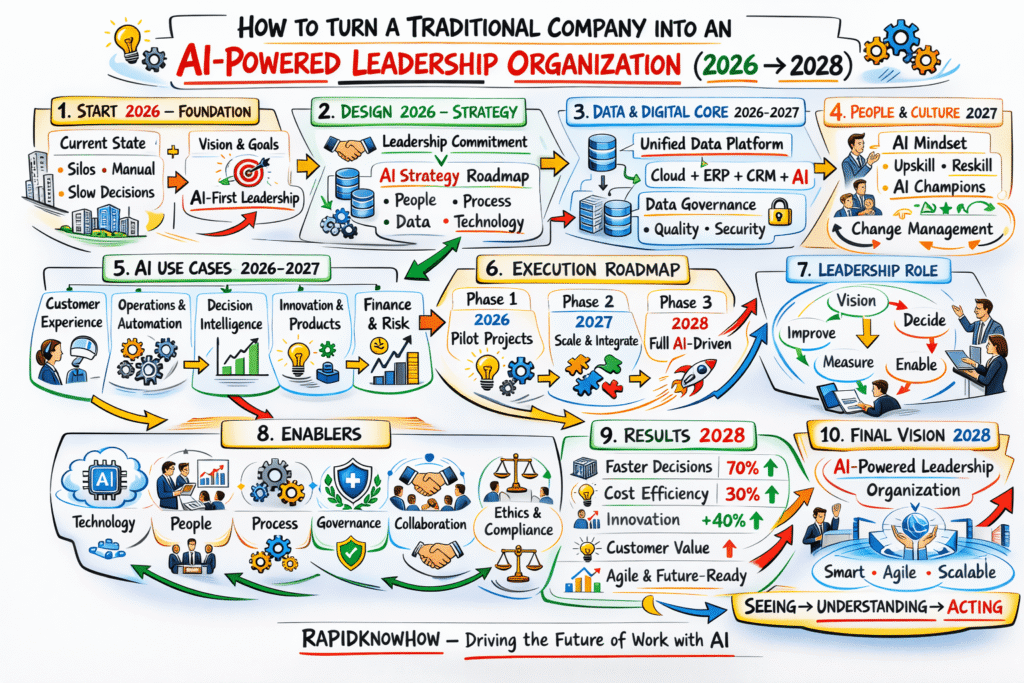
The RapidKnowHow VISUAL NOTETAKING System applied:
Turn Your Traditional Organisation into an AI-Powered Leadership System in 2026-2028